
Better Grouping

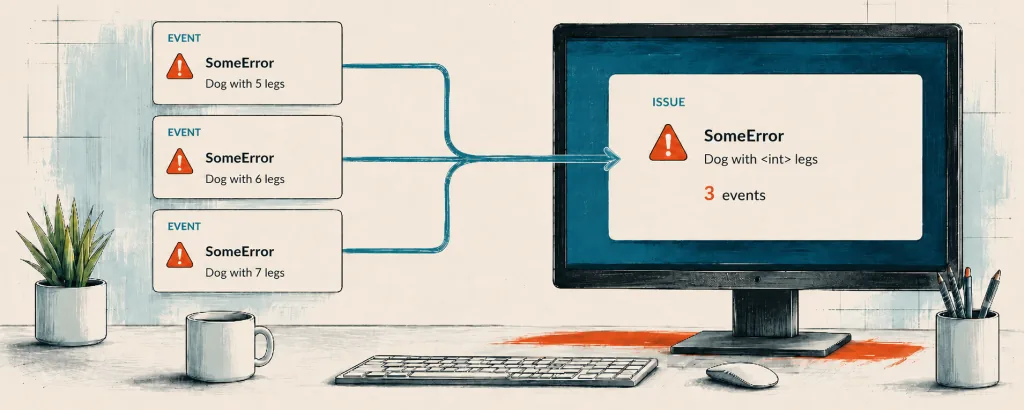
With Bugsink 2.5, I finally fixed a grouping problem that had been bothering me: exception values were taken at face value, so a changing ID in an otherwise identical exception produced a new issue.
The new mechanism normalizes variable-looking parts of exception values and log messages before constructing the grouping key. Repeated occurrences stay in one issue, while the original values remain visible on the individual events.
TL;DR:
- Exception values and log messages are normalized before they are used for grouping.
- Transaction names no longer split otherwise identical errors into separate issues.
- New projects use the new mechanism automatically; existing projects can opt in from their settings.
- Existing issues are not merged; new events that match an old key stay attached to the existing issue.
Background
An event in Bugsink is one observed failure. An issue is the collection of events that Bugsink believes came from the same underlying problem.
Grouping is therefore one of those features that is mostly invisible when it works. When it gets things wrong, the effects are quite visible: separate issue IDs, separate event counts and histories, separate resolved and muted states, and possibly another new-issue alert.
The old grouping mechanism was simple. For normal exception events, its key was effectively:
exception type + raw exception value + transaction
That worked well as long as the value did not change. But exception messages often contain runtime data.
The example that started issue #255 came from Bugsink’s own Hosted ingestion directory:
FileNotFoundError [Errno 2] No such file or directory: '/home/hosted/ingestion/67eed793eee14712a1fdd90b8f0497bf'
The final part of that path is an ingestion ID. The next missing file had another ID, and therefore produced another grouping key and a fresh issue.
Value normalization
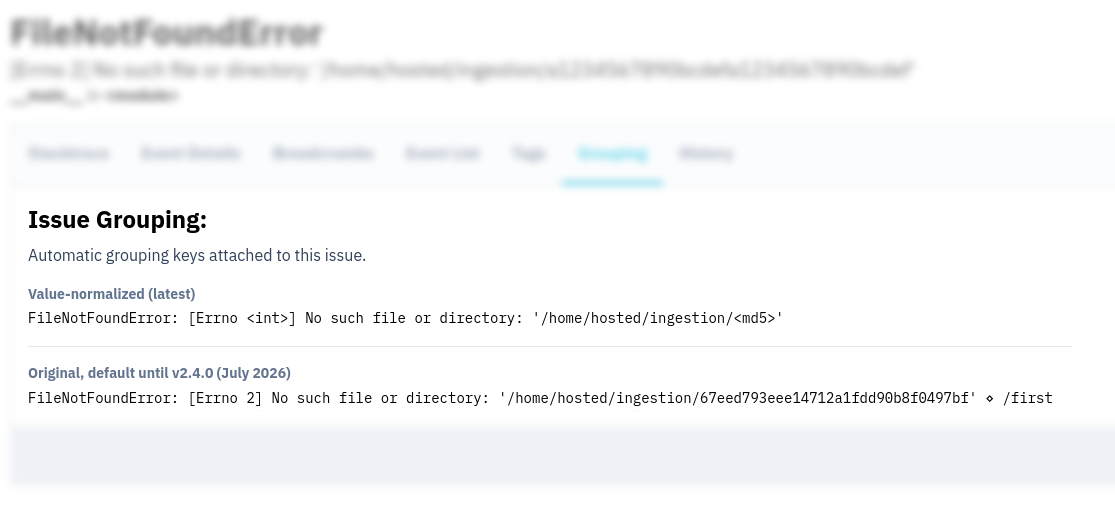
In Bugsink 2.5, the new grouping mechanism normalizes values before constructing the key. For the event above, the old key was:
FileNotFoundError: [Errno 2] No such file or directory: '/home/hosted/ingestion/67eed793eee14712a1fdd90b8f0497bf' ⋄ /first
The new key is:
FileNotFoundError: [Errno <int>] No such file or directory: '/home/hosted/ingestion/<md5>'
The same normalization is applied to log-message events that do not contain an exception.
The mechanism also removes the transaction name from the default key.
The same exception in /api/orders and /api/invoices is no longer split simply because it occurred in two routes.
How it is implemented
The normalizer is based on Sentry’s regex-based message parameterizer. Bugsink vendors the relevant code at a pinned Sentry commit and removes the Sentry-specific parts that Bugsink does not need.
It is deliberately a deterministic heuristic, not semantic understanding or program analysis. api1.example.com
and api2.example.com both become <hostname>, because the normalizer cannot know whether that distinction matters
to your application.
The patterns currently covered are:
- Network and contact values: email addresses, URLs, hostnames, and IPv4 and IPv6 addresses.
- Identifiers and hashes: UUIDs, SHA-1-shaped strings, MD5-shaped strings, and hexadecimal values.
- Numbers and time: integers, floats, dates and times, and durations such as
123msor1.5s. - Key/value literals: quoted strings in values such as
name='alice', and booleans in values such asactive=true.
Grouping too little versus grouping too much
A regex heuristic can also group events too broadly: integers sometimes carry actual domain meaning, and two different hostnames can represent two genuinely different problems.
I deliberately biased the default toward avoiding duplicate issues. Under-grouping creates another issue to triage and can send another alert. With over-grouping, the original events and their values are at least still available inside the issue.
When the heuristic is wrong for your application, fingerprints supplied by the Sentry SDK remain authoritative. A
fully explicit fingerprint is used unchanged, while {{ default }} expands to the new
normalized key. The grouping documentation has more on automatic grouping and fingerprints.
The original values are still there
Normalization only affects the internal grouping key. It does not rewrite the stored event or replace useful values in the interface.
The issue title uses the raw type and value from the latest event, so you still see the filename, address, duration, or identifier that occurred. Older events retain their own original values as well.
This separation was important to me: grouping benefits from ignoring incidental values, but those same values are often exactly what you need while debugging.
Enabling it for an existing project
New projects use Value-normalized (latest) automatically. Existing projects are not changed automatically: grouping changes should be explicit.
To get the new grouping behavior for an existing project, open its project settings and select Value-normalized (latest).
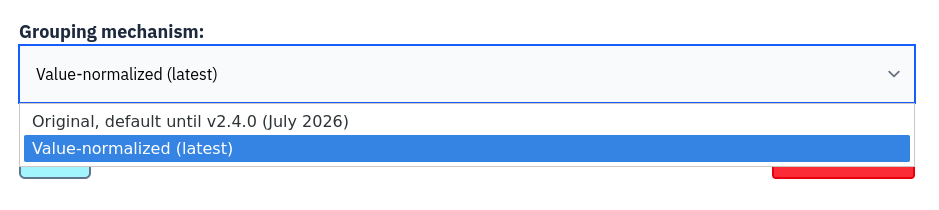
That starts a 30-day transition. New events that still match an old grouping key stay attached to the existing issue while it acquires its new key. Issues that were already split under the old mechanism are not merged.
Upgrading to Bugsink 2.5
Better Grouping is already available on Hosted Bugsink. Existing Hosted projects can opt in from their project settings; new projects already use it.
For self-hosted Bugsink, upgrade to Bugsink 2.5 or later. Then select Value-normalized (latest) for any existing projects you want to move over. See the Bugsink 2.5 release notes for the complete list of features and fixes in the release.
Let me know how it works for your errors, especially if you find a real-world example that is grouped too broadly or still split too often.