
Using Bugsink with Coding Agents


In the past 6 to 12 months, LLM-assisted programming has developed from “slightly better autocomplete” into something you can put to work on reasonably sized tasks (or more, depending on whom you ask). Bugsink provides a treasure trove of information about the full context of your production errors. That is a pretty good match.
This article describes three ways to give the error context collected by Bugsink to your coding agent:
- copy and paste the Markdown view from the UI
- connect your agent to Bugsink’s REST API
- let your agent talk to Bugsink through the Model Context Protocol (MCP)
The no-setup version: copy and paste
Bugsink collects error events and groups them into issues. The regular UI is designed for people, but each event also has a compact Markdown representation designed to carry the same useful context as text.
Open an event and scroll to the bottom of the stacktrace panel. The Markdown link sits beside Download and JSON. It opens a plain-text view containing the exception, stack frames, source context, and local variables. For example:
# BrokenLinkError Broken link to /api-documentation/ ## Stacktrace ### content/views.py:31 in `check_external_link` response.raise_for_status() #### Local variables * `href`: `"/api-documentation/"` * `page`: `"using-bugsink-with-coding-agents"`# BrokenLinkError Broken link to /api-documentation/ ## Stacktrace ### content/views.py:31 in `check_external_link` response.raise_for_status() #### Local variables * `href`: `"/api-documentation/"` * `page`: `"using-bugsink-with-coding-agents"`
That is already a useful agent prompt. The complete workflow is:
- open an event in Bugsink
- click Markdown
- select all and copy
- paste it into your agent of choice, together with what you want it to do
This deliberately simple approach is surprisingly effective. It gives you a human-in-the-loop checkpoint by default, does not require a token, and keeps the agent from browsing through unrelated issues.
Connect to the REST API
For repeated use, connect the agent to the API. Bugsink comes with a REST API guide and a complete OpenAPI reference.
Open Tokens in the top menu and create a token with only the read capabilities the agent needs. Prefer a service token for an automated workflow and restrict it to one project when the agent does not need installation-wide access.
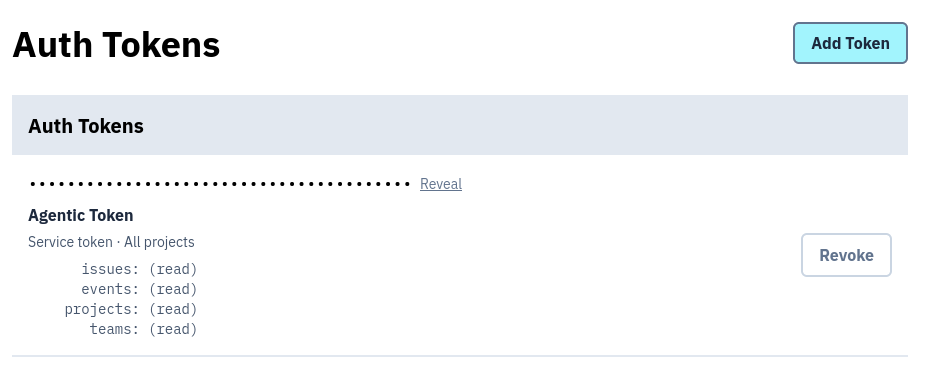
Put the token somewhere your agent can read it without committing it to the repository. Then give the agent the base URL and point it at the schema:
I put BUGSINK_TOKEN in .env; it's good for redacted.bugsink.com. Use the schema at /api/canonical/0/schema/ to get your bearings. I just ran into something for the "local development" project; tell me what it was and whether it's already fixed.
Here is the answer Codex gave while I was writing this article (excluding the reasoning and tool calls):
The latest issue was DOGFOOD-FOR-LOCAL-DEV-2022, at 13:53 UTC today: > BrokenLinkError: Broken link to /api-documentation/ The draft coding-agents article referenced the API documentation without its /docs prefix. The valid URL is /docs/api-documentation/. It is already fixed in the local working tree: the article now uses the correct URL, and the page renders successfully with HTTP 200. One caveat: the fix/article is still uncommitted, and the Bugsink issue remains marked unresolved. So it's fixed locally, but not yet landed or deployed. I made no changes.
The agent found its way around from the API schema and a little querying. This was also Bugsink helping debug the article about using Bugsink to debug code, which is pleasingly circular.
You do not have to limit the agent to the most recent issue. You could ask it to:
- find an issue with particular properties
- choose what to investigate next based on severity, age, volume, or affected users
- find a specific event based on its stack trace, message, or time
- inspect yesterday’s issues and propose fixes as pull requests
Closing the loop
An agent that can diagnose an issue can also propose a fix, open a pull request, and eventually mark the issue as
resolved. Bugsink’s issues:triage capability allows a token to resolve, reopen, mute, and unmute issues.
That does not mean the same token should have every available capability. Start with read access. Add triage access only when the workflow needs it, and keep a human approval step between “the agent thinks this is fixed” and changing the issue state. A merged pull request or a successful deployment is a much better trigger than the agent’s confidence.
Model Context Protocol (MCP)
The third option is MCP, an open standard through which AI applications can discover and call tools exposed by other systems. Bugsink does not currently ship an MCP server, but several third party implementations exist.
For this article I literally YOLO’d one of them (inside an appropriate box, of course). In Codex:
install https://github.com/rexlmanu/bugsink-mcp and hook it up to dogfood.bugsink.com
After installation and a restart, the prompt became even shorter:
Check redacted.bugsink.com using Bugsink. I just ran into something for that "local development" project; tell me what it was and whether it's already fixed.
The answer was effectively identical to the REST API example. That is both the appeal of MCP and the reason Bugsink does not provide an official server yet. MCP gives compatible clients named, typed tools without making each agent learn an API. On the other hand, it adds an adapter to install, audit, configure, and keep up to date. Bugsink’s API is already described by an OpenAPI schema, and current coding agents can use it directly.
An official MCP server may still make sense if it can offer a safer or more convenient workflow than the API alone. For now, the API covers the important use cases without adding another component or trust boundary.
A warning about AgentJacking
Agentic workflows introduce a specific version of the prompt-injection problem. Error data is untrusted input: exception messages, request data, breadcrumbs, and local variables can all contain text controlled by somebody other than you. An attacker may try to make that text look like instructions for the agent. When the malicious instructions arrive through data rather than through the user’s prompt, this is called indirect prompt injection; attacks that hijack an agent this way are also called AgentJacking.
Error trackers are particularly relevant because their job is to collect as much debugging context as possible. An attacker who can trigger an exception may be able to put chosen text in a URL, header, form field, database value, or local variable that ends up in the event.
Some DSNs are necessarily public too. For frontend JavaScript and native or mobile applications, the DSN cannot be treated as a secret. Anybody who has it can submit an event-shaped payload. A private server-side DSN reduces that easy route, but it does not make the collected data trusted.
Defenses against AgentJacking
There is no single prompt that makes indirect prompt injection disappear. Use ordinary security boundaries to limit what a successful injection could do:
- Give the agent the least privilege possible. Use a project-scoped, read-only token for investigation. Do not add
issues:triageor other write capabilities until the workflow actually needs them. - Keep unrelated credentials out of reach. Run the agent in a sandbox and expose only the repository, commands, network destinations, and secrets needed for the task.
- Require approval for consequential actions. Let the agent draft a patch or suggest a state change, but pause before merging code, deploying, changing issue state, or using any other write tool.
- Tell the agent to raise the alarm. Do not merely instruct it to ignore commands found in event data. Ask it to stop, make no further tool calls, and alert you when it thinks somebody is trying to redirect its behavior. Have it identify the event and field that triggered the warning. This helps detection, but it is not a security boundary on its own.
- Make behavior visible. Log tool calls, review unexpected reads or network access, and test the workflow with known prompt-injection strings so you know whether the controls around the model work.
- Do not publish a server-side DSN unnecessarily. For public clients, assume the ingest endpoint is attacker controlled and rely on the other defenses above.
- Set up a honeypot project for public DSNs. Create a separate Bugsink project and never give your agents access to it. Do not send legitimate events to it. Put its DSN near the real DSN in the public client configuration, then monitor the honeypot through an ordinary alert path outside the agent workflow. An event in that project suggests somebody found the exposed DSNs and tried to submit data, so it should trigger an investigation.
These are not Bugsink-specific rules. They follow the same least-privilege, human-approval, and layered-guardrail principles recommended in the OWASP guidance on prompt injection and OpenAI’s guide to agent safety.
Closing remarks
You do not need an AI feature built into your error tracker to make coding agents useful. Start by pasting an event’s Markdown view. If that becomes repetitive, give the agent a narrow API token. Add MCP only when its tool discovery and client integration are worth operating another component.
Whichever route you choose, the valuable part is the same: Bugsink has already collected the stack trace, source context, local variables, history, and tags that the agent needs. Give it that context, give it a bounded task, and keep the power to act proportional to how much you trust the workflow.