
Does Sentry Support Google Chat Alerts?


No. Sentry has no built-in Google Chat integration for issue alerts. As of November 20, 2026, Google Chat is absent from Sentry’s integration directory, and the feature request is still open. A paid plan doesn’t add the missing integration either.
You can connect Sentry to Google Chat through a custom bridge or a third-party service. But if you expected to paste a Google Chat webhook URL into Sentry and receive issue alerts, there is no built-in setup for that.
The Google Chat request
The original request dates back to July 2018. In July 2022, a Sentry contributor replied:
“we don’t have any plans to build a Google Chat integration.”
The suggested route was to build an internal integration. The issue was then closed. A new request, opened in May 2023, asks for native support again. Users were still asking for it and sharing workarounds in 2026.
Eight years is a fairly long time to wait for a chat notification.
Can a webhook do it?
A webhook is a transport, not a shared message format. Google Chat expects a message in its own format. Sentry’s alert payload needs to be turned into that message before it reaches Chat.
The GitHub discussions describe several ways around the missing integration:
- A bridge: receive a Sentry webhook, transform the payload, and post it to Google Chat. Users in the current request describe doing this with Pipedream.
- Email forwarding: a user in that same thread suggests sending Sentry’s email notifications to a Chat space’s dedicated email address.
- A self-hosted plugin: the original thread links a community plugin tested with Sentry 10. Its author explicitly says it requires your own Sentry server.
These are workarounds reported in the threads, rather than a native Sentry integration. The old plugin’s reported compatibility also isn’t a claim that it works with current Sentry releases.
Would a paid plan help?
Sentry’s pricing table puts email notifications on the free Developer plan and alerts through integrated tools on paid plans. That matters for a supported destination such as Slack: Sentry’s free plan does not include Slack alerts.
Google Chat has a different problem: the integration itself is missing. Upgrading to a paid Sentry plan does not turn it into a built-in destination. You still need a bridge or another workaround.
Google Chat alerts in Bugsink
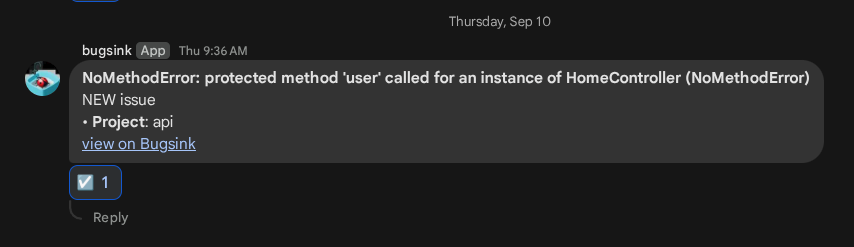
Bugsink has a built-in Google Chat integration. It sends issue alerts directly to a Chat space using an incoming webhook, with the issue title, project, and a link back to the issue.
It is included on Hosted Bugsink’s free plan, as well as the paid plans and self-hosted installations. You need a Google Workspace account that supports incoming webhooks; your Workspace administrator must allow them.
The setup is short:
- Create an incoming webhook in the destination Google Chat space.
- Add a Google Chat messaging service to your Bugsink project and paste the webhook URL.
- Save it, select Test, and check the space.
The Google Chat setup guide has the exact steps and requirements.
Switching from Sentry
If your application already uses a compatible Sentry SDK, you can keep it. Create a Bugsink project and replace the Sentry DSN with its Bugsink DSN, then configure the Google Chat destination on that project.
The switching guide covers the migration. No notification bridge to write first.