
Grouping
In Bugsink, events are automatically grouped into issues based on their characteristics. This minimizes noise from duplicate errors, so you can focus on solving real problems.
How it works
When an event occurs, Bugsink analyzes its data to determine how it should be grouped into an issue.
Exception events
For events that contain an exception, Bugsink extracts the exception type and message. If multiple exceptions are chained, it uses the last one, which is usually the most relevant. Before grouping, variable-looking parts of the message are normalized.
For example, two connection errors with different addresses and durations produce the same grouping key:
OperationalError: could not connect to 192.0.2.10:5432 after 123ms OperationalError: could not connect to 192.0.2.20:6543 after 456ms Grouping key: OperationalError: could not connect to <ip>:<int> after <duration>
The patterns currently covered are:
- Network and contact values: email addresses, URLs, hostnames, and IPv4 and IPv6 addresses.
- Identifiers and hashes: UUIDs, SHA-1-shaped strings, MD5-shaped strings, and hexadecimal values.
- Numbers and time: integers, floats, dates and times, and durations such as
123msor1.5s. - Key/value literals: quoted strings in values such as
name='alice', and booleans in values such asactive=true.
Normalization changes the internal grouping key only: the issue title and event data continue to show the original values.
Log messages
For log messages, Bugsink uses a simpler approach. The event is labeled as “Log Message”, and the first line of the log becomes the issue title. The log message is normalized for grouping in the same way as an exception value.
Inspecting grouping keys
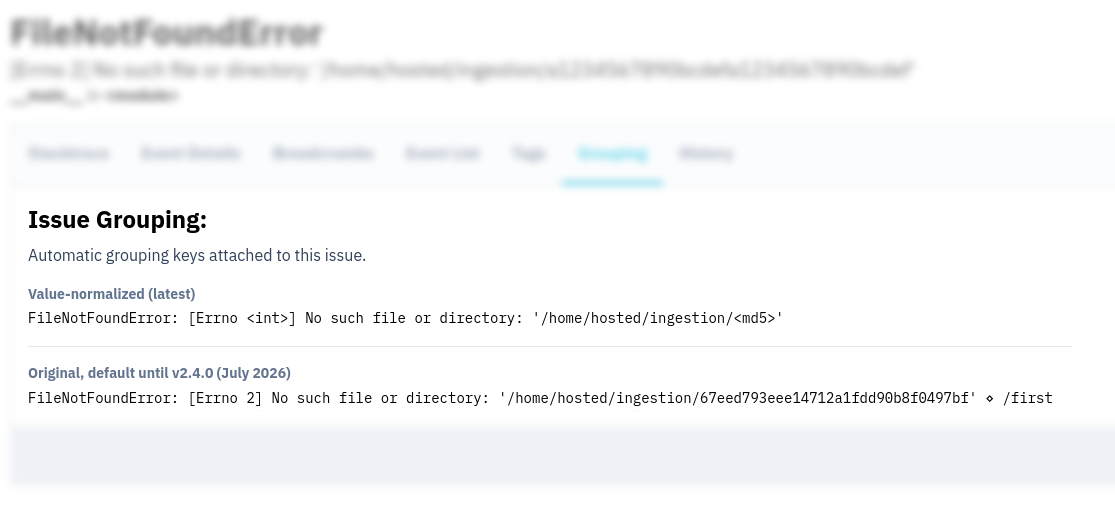
To help you understand how events are grouped, Bugsink provides a Grouping tab in the issue details. Here you can see the automatic grouping keys attached to the issue.
Fingerprinting
Bugsink allows you to customize how events are grouped using fingerprinting. You can specify your own fingerprints
to control how errors are grouped together. The string
"{{ default }}" can be used to include Bugsink’s automatic grouping key, while
additional details can be added to refine how errors are grouped. Read more on
fingerprinting.
Existing projects created before Bugsink 2.5.0
New projects use Value-normalized (latest) automatically. Projects created before Bugsink 2.5.0 keep their original grouping behavior until a project administrator selects Value-normalized (latest) in the project settings.
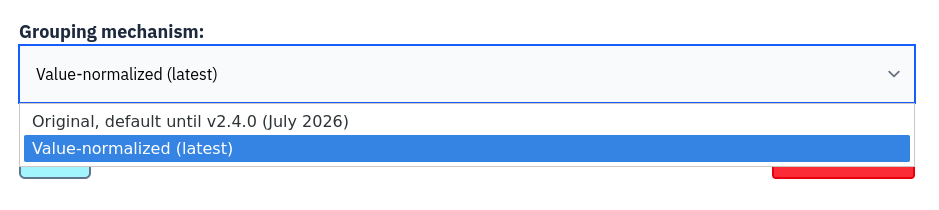
Changing the setting starts a 30-day transition. When an active issue recurs, Bugsink attaches its normalized key to the same issue, preserving its history and state. The transition does not merge issues that were already split under the original grouping behavior.
Original grouping (v1)
Projects created before Bugsink 2.5.0 use the original grouping mechanism until you change their project setting. Its main grouping factors are:
- Exception Type and Value: Bugsink extracts the type and message of the last exception in the chain.
- Transaction: If the event contains a transaction, Bugsink incorporates it into the grouping key. This can keep the same error separate when it occurs in different parts of your application.
For log messages, v1 labels the event as “Log Message” and uses the first line as the grouping value. It does not normalize variable-looking parts of exception values or log messages.