
Housekeeping
At high volume or over time, Bugsink can fill up disk space. Although it’s designed to minimize manual cleanup, larger or long-running installations may require occasional housekeeping to keep the system running smoothly. This page outlines the key areas to focus on.
Most event cleanup happens automatically through the default retention/eviction mechanism.
The main recurring maintenance tasks have a single synchronous entry point, bugsink-manage vacuum. Some cleanup
remains intentionally separate: issue and project deletion are explicit user actions, external event-storage cleanup
depends on the configured storage backend, and database-level space reclamation is handled by the database engine rather
than Bugsink.
In this page, we will cover:
- Where to look: what kinds of things can fill up; and how can you detect whether that’s needed
- What to do: how to clean up the things that can fill up, which commands are available, and how to automate them
We’ll focus on Bugsink itself; but in the final section we’ll briefly touch on database-level cleanup, since the database is typically the thing that fills up first and is the most opaque.
General setup tips
If you’re considering how to run cleanup tasks, you’re likely operating at the scale where external event storage is worth considering.
Bugsink’s default setup stores full event payloads in the database. That’s great for simplicity, but has downsides at scale:
- Disk space ties to DB size
- Migrations get slower and riskier
- Backups and restores become unwieldy
- It’s more opaque: seeing what is taking up space is harder
Bugsink supports storing event payloads as flat files (or other backends) while keeping the metadata in the DB. It’s a good idea in any high-throughput setup, not just for archival. For details, see moving event data out of the database
Event eviction and retention
Bugsink automatically deletes events over time to manage disk usage. This is based on a smart retention algorithm that tries to keep the most relevant events while discarding older or less useful ones.
The default number of events to keep per-project is 10,000; this setting can be adjusted in the project settings UI. Retention is applied automatically during normal operation (as part of the digest process), so you don’t need to run a separate cleanup job for this.
For installations that need an absolute maximum event age, Bugsink also supports MAX_EVENT_AGE_DAYS. This is separate
from smart retention: it deletes events older than the configured age when you run bugsink-manage delete_old_events or
bugsink-manage vacuum --old-events. Use it as a hard operational cap, not as the main retention model.
When an event is deleted, Bugsink also removes most related data like tags and metadata, although tag values may become orphaned (see below).
For more background, see Rate Limits and Retention.
Locations on disk
These are the main places where Bugsink stores data that can grow over time.
-
Database: Primary storage for all Bugsink-related data, including issues, tags, etc. In the default setup this includes the event payload verbatim; if you’re using the event storage feature, the event payloads are stored in a separate location, but the metadata is still in the database.
-
Ingestion store: events during ingestion; this location is short-lived in principle, but if you’re running a high-volume Bugsink, it can fill up (in proportion to the backlog of events to process), and it may also fill up if the ingestion worker is not running, misconfigured or crashing. Configured as
INGEST_STORE_BASE_DIR, by default:/tmp/bugsink/ingestion.
File event storage: if you’re using the file event storage feature, this is where
the event payloads are stored. This is configured in bugsink_conf.py via BUGSINK["EVENT_STORAGES"], or in Docker via
FILE_EVENT_STORAGE_PATH and FILE_EVENT_STORAGE_USE_FOR_WRITE.
Identifying what needs cleanup
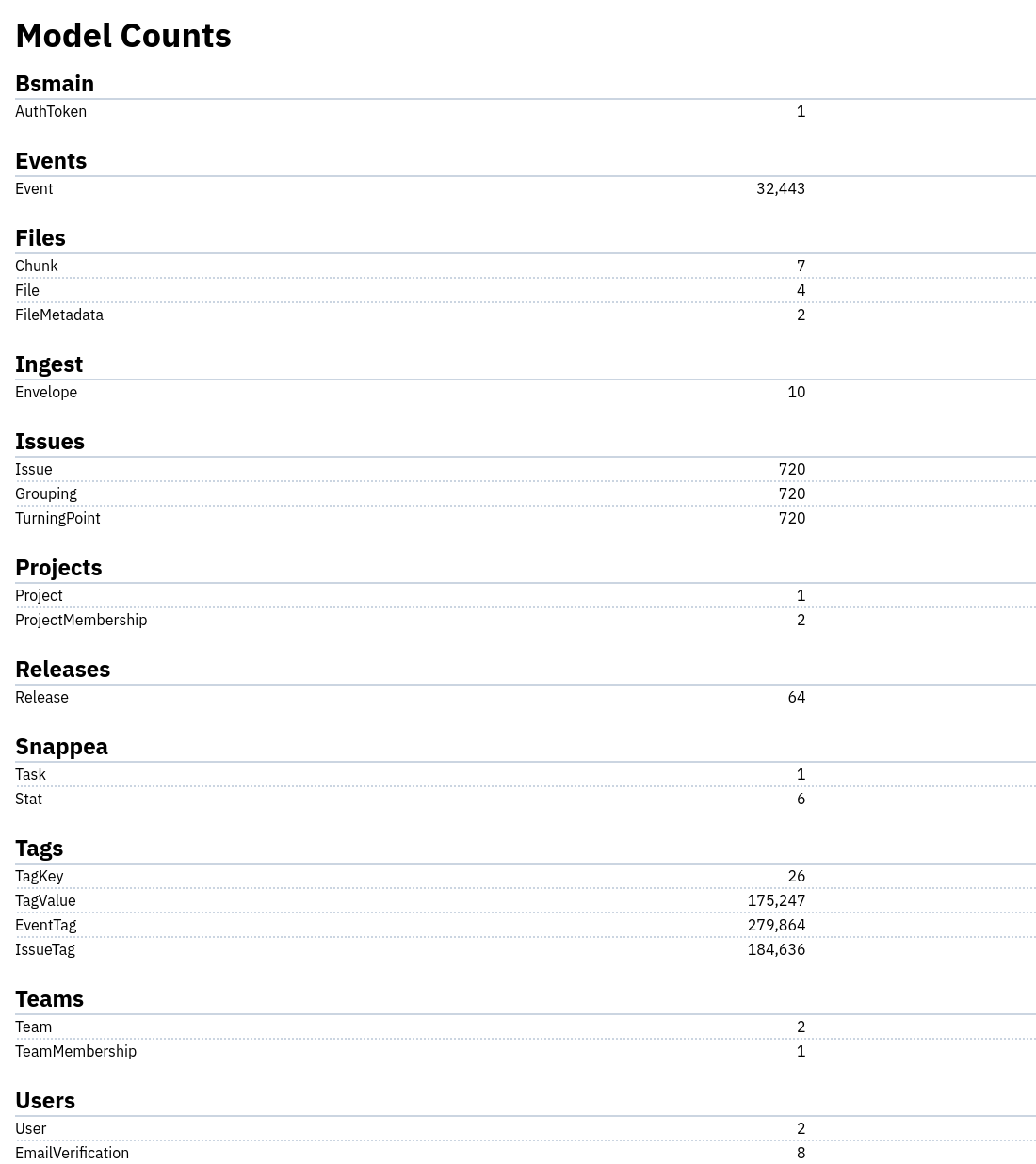
You can get a rough overview of the contents of the database using the /counts/ page in the UI (as a superuser; simply
visit https://YOURBUGSINK/counts/). On this page you can see counts of various objects in the system, such as
issues, events, tags, and more.
This can help you get as sense of how much data you have stored in your database, and can serve as a starting point for identifying what might need cleanup.
For example, if you see a very high number of tags or events compared to issues, it may indicate that there are orphaned rows that need cleanup. Alternatively: if you see relatively low numbers across the board, but your database keeps growing, your problem may be at the level of the database itself, and you may need to look into database-level cleanup.
Recommended cleanup command
For routine maintenance, use:
bugsink-manage vacuumRuns the main cleanup tasks synchronously and waits for them to finish. With no flags, it runs file cleanup, tag cleanup, eventless-issuetag cleanup, old-event cleanup, and ingest-dir cleanup. You can also run just one family with flags such as--files,--tags,--eventless-issuetags,--old-events, or--ingest-dir. The--old-eventspart only deletes events whenMAX_EVENT_AGE_DAYSis configured, or when you pass--max-event-age-days.
This is the command to prefer for cron or other scheduled maintenance, because it runs inline and finishes before the process exits. That makes failures and runtime visible to the scheduler.
It might make sense to set up a periodic job (e.g. daily or weekly) to run bugsink-manage vacuum, especially if you
have a high volume of events or issues. This can help keep the database size manageable and prevent orphaned data from
accumulating.
Targeted cleanup commands
These commands are also available when you want to run one cleanup path directly. The vacuum_* commands are async
wrappers for ad hoc admin use: they kick work to snappea and return after scheduling it. The vacuum command is usually
better for scheduled maintenance because it waits for completion.
-
bugsink-manage vacuum_tagsRemoves unusedTagKeyandTagValueentries left behind whenEventsorIssuesare deleted. (checking for unused tagvalues is not done at each event-eviction / issue-deletion for efficiency reasons). run periodically to keep the tag tables from growing indefinitely. -
bugsink-manage vacuum_filesRemoves unused file-related entries in the database, such asChunkandFile. As it stands, this basically means “things related to sourcemaps”. The optionalMAX_STORED_FILE_COUNTandMAX_STORED_FILE_BYTESsettings provide site-wide caps for this cleanup. See issue #129. -
bugsink-manage vacuum_eventless_issuetagsDeletesIssueTagentries that no longer have a correspondingEventTagon the sameIssue. Running this command will removeIssueTagentries that are stale in the sense that Event that led to their creation has already been deleted. The command exists; what remains a policy question is whether this should happen automatically as part of event deletion. -
bugsink-manage delete_old_events [--days N] [--project-id ID]Deletes events whosedigested_atis older than the configured cutoff. If--daysis omitted, Bugsink usesMAX_EVENT_AGE_DAYS; if neither is set, the command refuses to run. This cleanup is intentionally blunt: it is based on event age, not relevance, and includes events that were marked asnever_evict. -
bugsink-manage cleanup_eventstorage <storage>Removes stored event payloads that no longer have a matching Event in the database. In theory, this happens during Event deletion, but in practice it may not always be reliable because the event-storage is disconnected from the database by design. This command is not part ofbugsink-manage vacuum; run it when you use external event storage and suspect stale payloads.
Deleting projects and issues may make sense too, though you should be
aware that deleting issues is often not what you want. Issue and project deletion are not part
of bugsink-manage vacuum, because they remove user-facing history and can break external links.
Finally, there’s a command that may help in some cases (it’s not so much a cleanup command as a consistency command):
bugsink-manage make_consistent [--dry-run]Deletes dangling objects (Events, Issues, etc) and updates counters. “In theory” Bugsink should do this itself; but may be needed if the database was modified directly and perhaps in the case of crashes (though those would be a bug in Bugsink, so feel free to report them on GitHub). WARNING: this command may run for a long time, in a single write-locking transaction.
DB-level cleanup
All relational databases have trade-offs around how they handle deletions and disk usage. Most don’t immediately reclaim space when rows are deleted; they mark the space as reusable instead. Over time, especially with frequent insert/delete cycles, this can cause database files to grow unexpectedly.
If you suspect this is happening, you might need to run a vacuum or similar command to reclaim space. To do this, you can refer to your database’s documentation for the specific command to run. Search for terms like
VACUUM <your database>table bloat <your database>optimize table <your database>
or consult the docs for your specific backend.
In the past, the following hints have also been useful in cleaning up database-level issues:
-
Binary logs can grow large, especially if you have a high volume of events. If you’re using MySQL or MariaDB, you can periodically purge binary logs to free up space.
-
When the database itself runs inside Docker, disk space may not shrink as expected. Docker volumes can retain allocated space even after data is removed, making it harder to verify that cleanup operations actually worked. See
docker system dfanddocker volume lsfor clues.
Still intentionally manual
Most recurring cleanup is covered by bugsink-manage vacuum, but a few things remain intentionally manual or policy
dependent.
Issue deletion is manual because automatically deleting issues after the last event disappears would break links, remove comments/history, and make future occurrences appear as fresh issues rather than regressions. A future orphaned-issue cleanup command may still be useful, but it would need to be explicit and warning-heavy.
IssueTag cleanup has a command, but automatic cleanup still depends on the product decision described above: some
users want issue tags to describe only stored events, while others want them to preserve the full issue history.
Relevant tracking issues:
Conclusion
Bugsink is built to clean up after itself where possible, deleting related data when issues or events are removed. Still, over time, and especially at higher volumes, some manual housekeeping may be needed to free up disk space, enforce operational caps, or clarify what’s actually being stored.
The tools and options described above help you stay ahead of that without pretending that every long-running install is fully self-cleaning.